Create new sub-organisations (practices) with flexibility and view reports across all sub-organisations in one place
The Multi-Org account now supports two new capabilities: Selective Cloning when creating a new sub-organisation (practice), and Centralised Reports for viewing lead data across all sub-organisations.
Instead of cloning everything from an existing sub-account or switching between accounts to check reports, you can now choose exactly what to clone and view consolidated data from a single dashboard.
As Multi-Org (multi-practice) accounts grow, teams often need more control over how new sub-organisations are set up and a clearer view of performance across all of them.
✅ These updates are designed to give multi-location and multi-practice teams greater flexibility and visibility. Instead of working with rigid cloning or fragmented reporting, you can now tailor new sub-accounts to your needs and track activity across your entire organisation from one place.
This helps teams:
Set up new sub-organisations (practices) faster with only the elements they need
Avoid carrying over unnecessary settings from other sub-organisations
View activity across all sub-organisations in a single dashboard
Reduce time spent switching between accounts to review performance
Previously, when creating a new sub-organisation (practice) in a Multi-Org, you had two options: Create from scratch or Clone from an existing account. Cloning copied everything from the selected sub-organisation with no option to pick and choose.
You can now select exactly which elements you want to clone from an existing sub-account, giving you full flexibility over how your new account is set up.
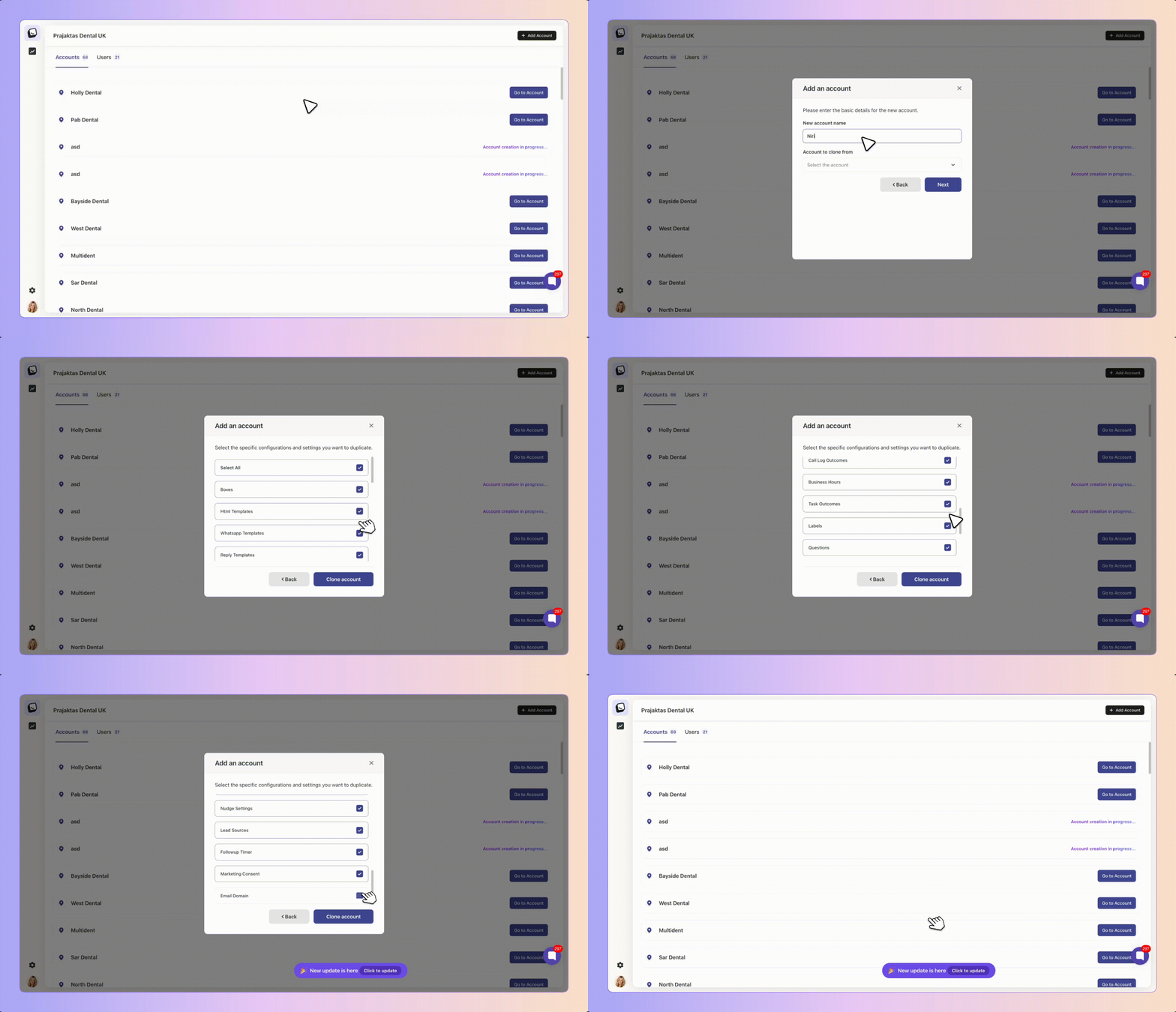
To use it:
Open your Multi-Org account and click Add Account
Select Clone from an existing account
Enter your new account name and select the sub-organisation to clone from
Click Next
Select the elements you want to copy across
Click Clone Account

You can selectively clone any of the following from an existing sub-organisation.
Boxes and HTML templates
WhatsApp templates
Reply templates
Automations
Milestones
Loss reasons and custom variables
Call log outcomes
Business hours
Task outcomes
Labels
Questions
Nudge settings
Lead sources
Follow-up timings for marketing and sent items
When you deselect an item during cloning, Boxly handles it in one of two ways depending on the type of item.
Items that fall back to Boxly defaults:
Boxes
Business hours
Follow-up timer
Variables
Items that will be empty:
Milestones
Labels
Fields
Templates (HTML, WhatsApp, reply)
Automations
Lead sources
Questions
And other front-end configurable items
ℹ If you don't select these, they will remain empty in the new sub-organisation and can be created manually whenever needed.
✅ In short: anything created from the front-end will be empty if not selected during cloning.
Managing multiple sub-organisations (practices) often means switching between accounts to understand what's happening across your business. Centralised Reports bring all your sub-organisation data together in one place.
You can now view activity across your entire Multi-Org account without switching between sub-organisations.
ℹ Centralised Reports are only accessible to Organisation Admins.
Centralised Reports are available within the existing Reports section of your Multi-Org account. Currently, this is available as a Dashboard view.
To use it:
Open the Reports section in your Multi-Org account
Select a date range for the reporting period
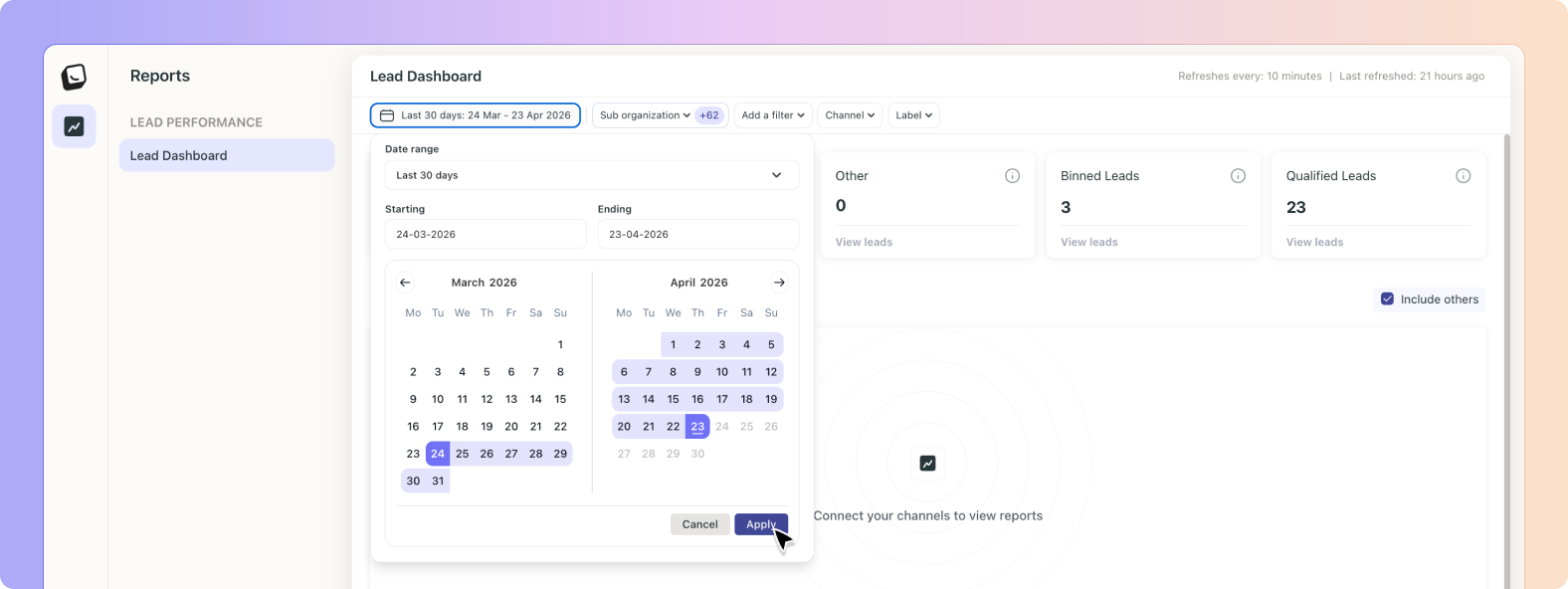
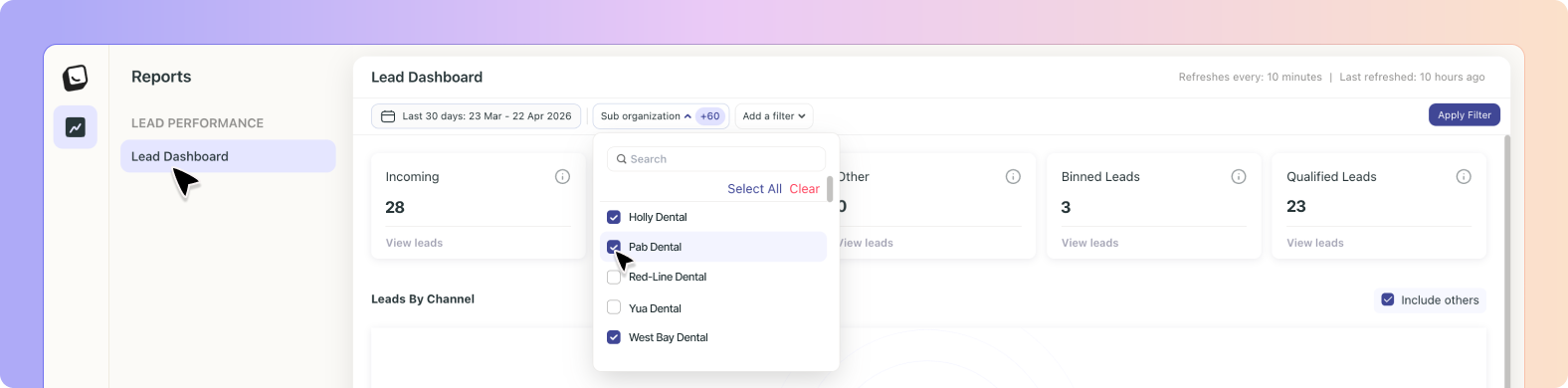
Select the sub-organisations you want to include
Apply filters to refine the data
Click View Leads
To keep reports relevant across sub-organisations, filters are limited to fields that are commonly used across all accounts.
Channel
Label
Source
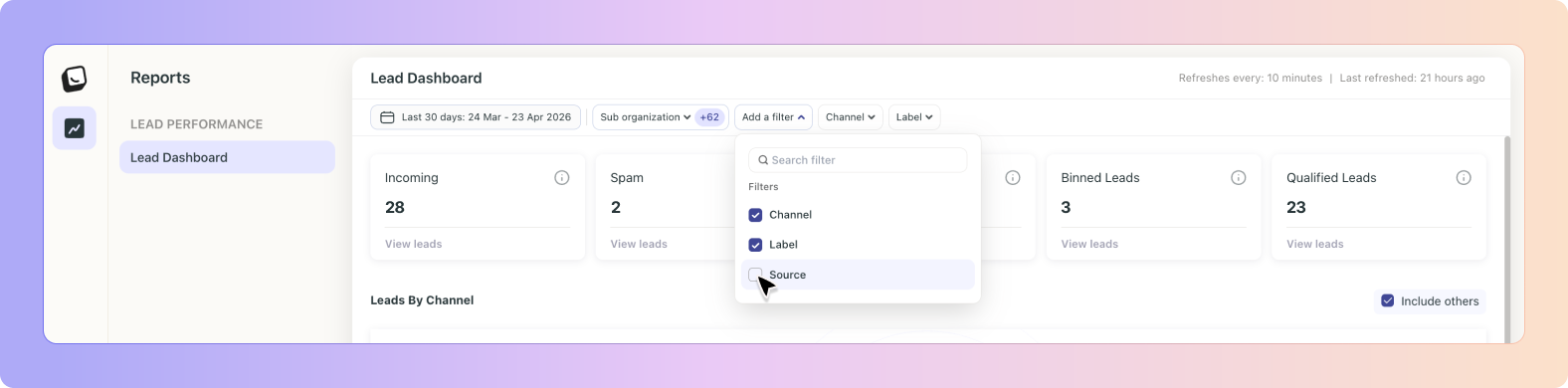
ℹ These filters were chosen because they are typically standardised across sub-organisations, making the data comparable and meaningful.
Once you've set your filters and clicked View Leads, you'll see a detailed breakdown including all the standard lead columns, along with the practice name (sub-organisation name) so you can quickly identify which account each lead belongs to.

Yes. Simply select all the available options when cloning, and the behaviour will be the same as before.
It depends on the item. Boxes, business hours, follow-up timer, and variables will use Boxly's defaults. Other items like milestones, labels, fields, templates, and automations will remain empty until you set them up manually.
Yes. Once the new sub-organisation is created, you can update any of the cloned settings just like any other account.
All sub-organisations within your Multi-Org account are available to select. You can choose one, several, or all of them.
These fields are commonly shared across sub-organisations, which keeps the report meaningful when comparing data across different accounts.
Currently, the Dashboard view is available. Additional report types may be introduced in future updates.
Centralised Reports are only available to Organisation Admins. Other users within the Multi-Org account will not see this section.
Multi-Location Plan 📍
Powerful plan for businesses with multiple locations, practices or venues to centrally manage all leads in one account.
Boxly is here to help you work smarter, not harder, let's keep streamlining your lead management together!
Contact us at [email protected] if you need any assistance!