Marketing Consent allows your practice to manage whether leads receive marketing and promotional communications via email, SMS, and WhatsApp.
Boxly lets your team set a default consent behaviour, while always ensuring the lead's own preference comes first.
Marketing Consent is not just a toggle. It is a system that says: "The patient's choice always wins."
Sending marketing messages to leads who have not agreed to receive them can damage trust and create compliance risks.

Stay compliant with marketing communication standards
Respect patient preferences without manual effort
Avoid sending unwanted messages
Keep a clear record of each lead's consent status
Consent is managed at two levels:
Practice Default: configured by your team admin in Settings
Lead Preference: captured from the lead directly, or updated manually
Marketing Consent is currently available for:
Web Form
Chatbot
Only Admins can configure Marketing Consent defaults.
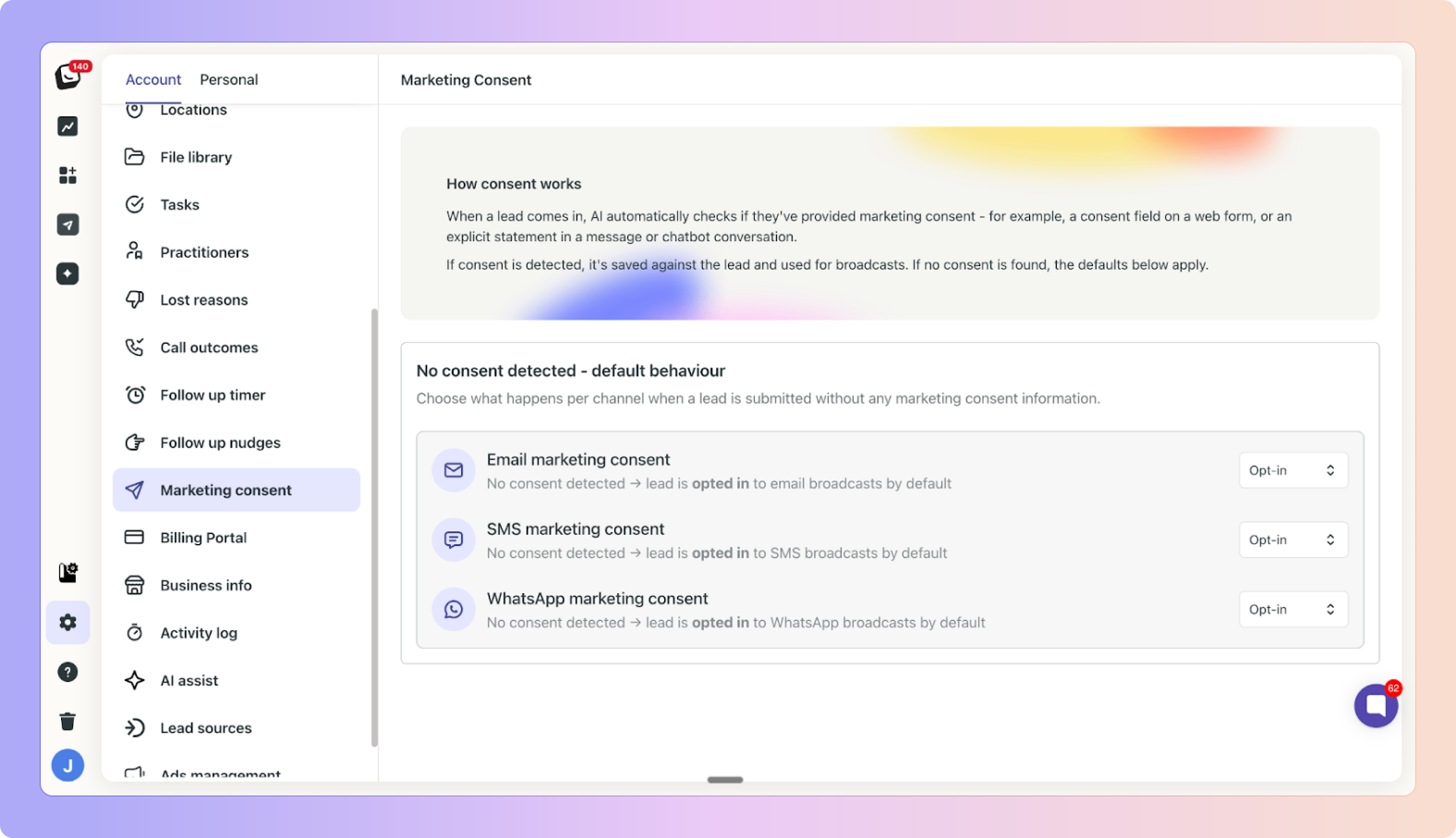
Settings are located in:
✅ Settings → Account → Marketing Consent
Admins can set the default consent status for:
Email marketing
SMS marketing
WhatsApp marketing
Each channel can be individually set to Opt-In or Opt-Out.
✅ Opt-In - leads arriving via Web Form or Chatbot will have consent enabled by default, unless they choose otherwise.
✅ Opt-Out - leads will not have consent enabled by default.
✅ These settings can be updated at any time.
When a lead submits a web form or interacts with the chatbot, they may be asked whether they want to receive marketing communications.
A lead submits an enquiry via a web form.
The practice default is Opt-In for email and SMS
On the form, the lead agrees to email but opts out of SMS
The lead is created with email consent enabled and SMS consent disabled

Each lead's consent status is visible directly on their lead card.
You can find it under:
✅ Lead Card → Contact Section
If a lead's preference changes at any point:
Open the lead card
Go to the Contact section
Find the Marketing Consent toggle
Turn it on or off as required
A team admin sets the practice default to Opt-In for email and SMS. A new lead arrives via a web form and opts out of SMS but agrees to email. Even though the default has SMS opted in, the lead's preference overrides it automatically, no manual action needed.
Some time later, the lead asks to stop receiving emails during a conversation. A team member opens the lead card, goes to the Contact section, and toggles off email consent. The change is saved instantly.
Without Marketing Consent, the lead may have received messages they never agreed to. With it, their preferences are always respected, automatically and manually.
Who can configure Marketing Consent settings?
Only Team Admins, via Settings → Account → Marketing Consent.
Which channels are currently supported?
Web Form and Chatbot. More channels will be added in future updates.
Does the practice default always apply?
No. If a lead has expressed their own preference, that will always take priority.
Where can I see a lead's consent status?
In the Contact section of the lead card.
Can consent be updated after a lead is created?
Yes. Any team member can update the toggle in the Contact section of the lead card at any time.
What if the lead did not see a consent option on the form?
The practice default setting will apply.
Need Help? If you have questions about Marketing Consent or need help configuring your settings, our support team will be happy to help at [email protected].
Inviting a new Team Member
Guide to inviting a new user/team members
Card Design
Design the perfect lead card